Swapping Assets in SwiftEx

Modified on Fri, 20 Jun 2025 at 11:27 AM
Swapping Assets in SwiftEx
Click to expand

SwiftEx makes it easy to exchange one cryptocurrency for another directly within the app whether you’re a complete beginner or a seasoned trader. The Swap feature is designed for users who want a quick, secure, and seamless asset exchange experience without diving deep into technical trading tools. Think of it as the easiest way to convert your crypto at the best available rate — in just one tap.

How do Swaps Work in SwiftEx?

SwiftEx uses smart routing and decentralized liquidity protocols to ensure your assets are exchanged using the most optimal market path. When you initiate a swap, SwiftEx looks for the best available trade path whether it's a direct swap (e.g. ETHUSDC) or a multi-hop trade (e.g. ETHSOLUSDC) — to get you the best price with minimal slippage. Swaps in SwiftEx are powered by secure, decentralized exchanges and liquidity aggregators.

What You Need to Know Before Swapping

  • Slippage Tolerance: Swaps are designed to be accurate, but market prices can move quickly. If the price changes by more than your set slippage tolerance (default is usually 1%), the swap won’t go through to protect your funds.
  • Liquidity Warning: Swapping tokens with low market liquidity may result in significant losses or failed transactions. Always check the final quote before approving a swap.
  • Minimum Token Balance: Certain blockchains (like Stellar or Solana) require a minimum reserve to hold a new asset. For example, Stellar requires 0.5–1 XLM (approx) to open a new trustline (hold a new asset).
  • Network Fees: A small fee is included in your swap quote to cover network and protocol costs. This fee may vary depending on the asset you are buying and network congestion.

How to Swap Assets in SwiftEx

  1. Open the Swap Feature
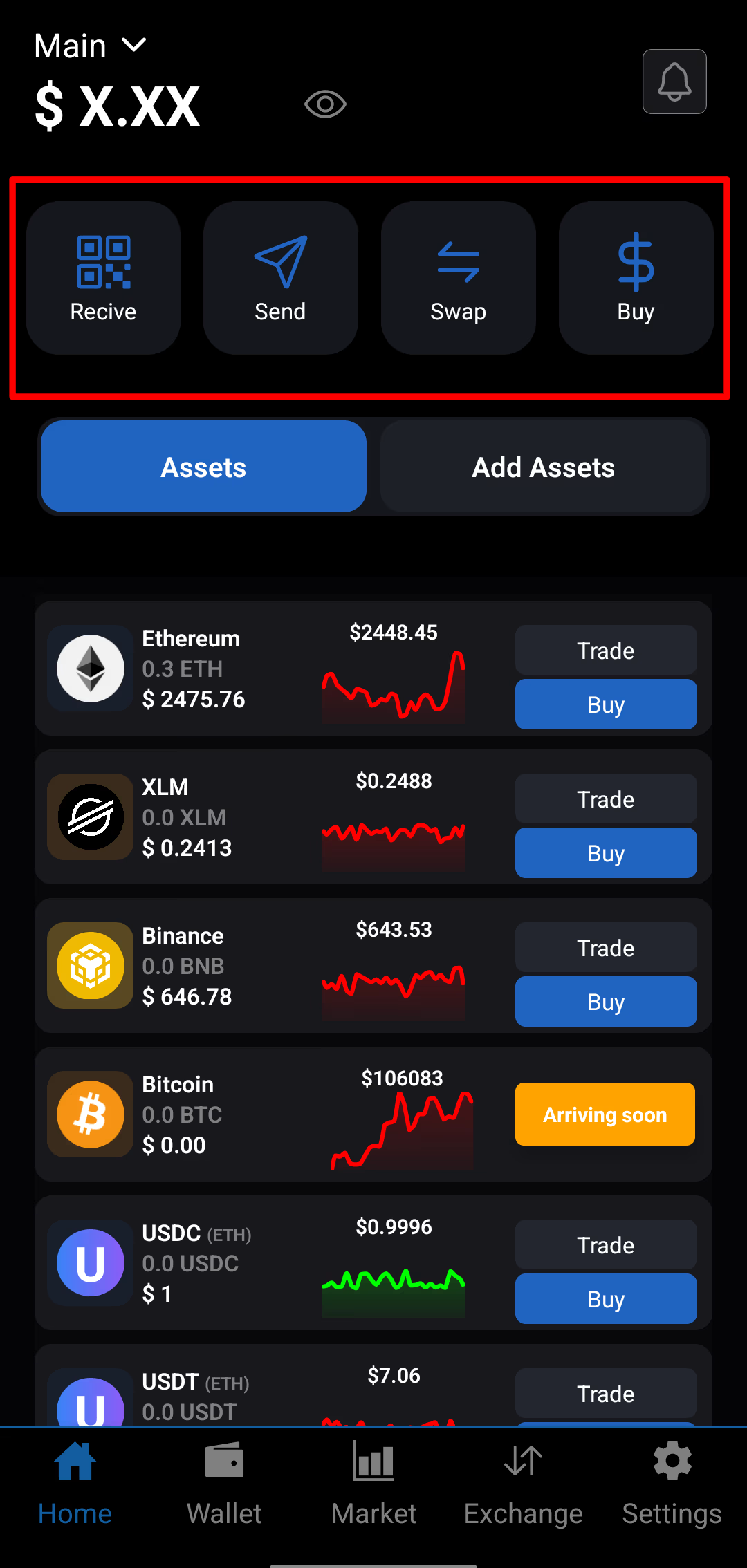
    Launch the SwiftEx app. Tap the ‘Swap’ button on the home screen.
    Step 1: Open Swap
  2. Choose the Preferred Token Pair to Swap
    In the ‘You Pay’ field, select the token you want to sell. In the ‘You Receive’ field, select the token you want to buy. Enter either the amount you want to pay or the amount you want to swap. SwiftEx will automatically calculate the matching value based on live market data.
    Step 2: Choose Token Pair
  3. Review and Confirm the Swap
    Check the exchange rate, network fee, and estimated time for the swap. Make sure the tokens and amounts are correct — once confirmed, the transaction cannot be reversed. Tap the ‘Swap’ button to proceed.
    Step 3: Confirm Swap

Important Notes & Tips

If the swap fails, try adjusting the swap amount, selecting a different token pair, or increasing your slippage tolerance. Some tokens require additional approval transactions or gas fees. SwiftEx will guide you if that’s the case. If you’re adding a token you don’t already hold in your wallet (on networks like Stellar), make sure you have the minimum base reserve (like 0.5–1 XLM).

Swap Fees on SwiftEx

SwiftEx includes a transparent fee model directly within the swap rate. The fees vary based on:

Asset TypeSwap Fee
Scam-reported tokensUp to 15%
Unknown / low-verified1%
Standard (known) assets0.75%
Curated tokens0.3%
Featured tokens (e.g., USDC, XLM, ETH)0.2%

SwiftEx does not charge any extra fee on top of this — it’s included in your quoted swap rate. Still have questions about swapping? Check the Help Center or contact SwiftEx Support directly in the app.

Was this article helpful?

Join the Waitlist

Be the first to experience our revolutionary crypto app. Sign up now!

Join 1,000+ others
Early accessExclusive features

Have more questions?

SwiftEx support is available 24/7 from within the app! Or contact us at info@swiftexchange.io

Contact us